Uploading Facility Documents to ACC Vault
This guide outlines the process for uploading relevant Facility Documents to ACC Vault that are not part of a project's contractual closeout deliverables.
The Uploads folder serves as a temporary intake location with the BATS Space & GIS Team reviews, organizes, and files documents into the appropriate permanent location.
Applicable Documents
This can include but are not limited to:
- Condition Assessments
- Engineering Reports
- Load Studies
- Test and Balance
- Laser and Thermal Scans
- Existing Floor Plans from undocumented or legacy projects
- Other facility record documents that should become part of the record
Procedure
Step 1 - Open the Project Vault
Navigate to the appropriate ACC Vault for the Site.
Step 2 - Open the Uploads Folder
Within the Vault, locate and open the Uploads folder.
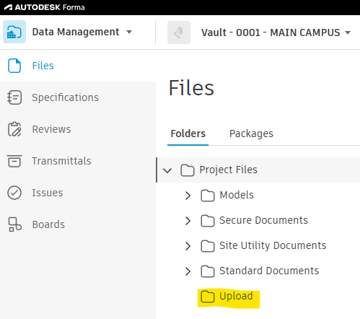
Step 3 - Upload Your Documents
Drag and drop your files or use the Upload files button.
Step 4 - BATS Review and Filing
Once Uploaded, the BATS Space & GIS Team receives an automatic notification. The team will:
- Review the document
- Verify that it belongs in the facility record
- Move it to the appropriate permanent folder within the ACC Vault
- Maintain a consistent folder structure across all campus facilities.
Most of the aforementioned documents will belong in the project's building Reports section, located at Standard Documents > Building Number > Reports > Appropriate Report Type.
Important Notes
- The Uploads folder is intended to be a temporary staging area and should not be used as permanent document storage.
- Using this process helps maintain a standardized filing structure across all UF Facility Records, making documents easier to locate and manage.
Questions
For questions regarding document placement, or acceptable file types, contact the BATS Space & GIS Team or put in a Bili Ticket.